
RPE Calculator
Enter the weight, reps and RPE of a hard set. You get your estimated 1RM and the exact load for every rep and RPE target. Click Calculate RPE to see your results.
Your set
RPE chart for your numbers
Every load is based on your estimated 1RM. Your set and your target are highlighted.
What Is an RPE Calculator?
An RPE Calculator is a workout tool that uses your perceived effort to plan lifting loads. RPE stands for Rate of Perceived Exertion, a 1–10 scale that tells you how hard a set feels. In weightlifting, RPE links effort with how many reps you have left in reserve. For example, RPE 10 means a max effort with 0 reps left (failure), RPE 9 means you had about 1 rep left, RPE 8 means 2 reps left, and so on. By entering the weight you lifted, the reps you did, and the RPE of that set, the calculator estimates your strength. It uses this data to compute your estimated one-rep max (e1RM) and to suggest weights for future sets. For instance, if you lifted 225 lb for 5 reps at RPE 8, the calculator can tell you what weight to use for, say, 3 reps at RPE 9. This makes planning workouts intuitive: you train at the right intensity each day without guessing.
How to Use the RPE Calculator
Using an RPE calculator is easy and user-friendly. First, enter the weight, number of reps, and RPE from a recent set you performed. Most calculators let you pick the units (lbs or kg), then type in the weight lifted, the reps completed, and your RPE rating for that set. Next, choose the target reps and target RPE for your upcoming set. For example, you might aim for 3 reps at RPE 9. The tool will then use your input to compute results. Finally, hit Calculate: the tool will output your estimated one-rep max (e1RM) and the target weight you should lift for the chosen reps and RPE. In other words, it shows you exactly how much weight will make, say, 3 reps feel like an RPE 9, given your last performance. This way, you get precise load recommendations based on your actual effort, not just fixed percentages.
- Enter Weight, Reps, and RPE: Input the weight you used, the number of reps you did, and the RPE for that set. This is your reference set.
- Choose Target Reps and RPE: Pick a new goal, for example “4 reps at RPE 8”.
- Calculate e1RM and Target Weight: The calculator will display your estimated 1RM and the exact weight to hit your target rep/RPE combo. It often rounds to the nearest plate increment so you can load the bar easily.
RPE Chart for Weightlifting
An RPE Chart translates reps and RPE into load percentages. It’s like a lookup table telling you what percentage of your one-rep max each RPE/rep combination represents. Below is a typical RPE scale (common in powerlifting and strength training):
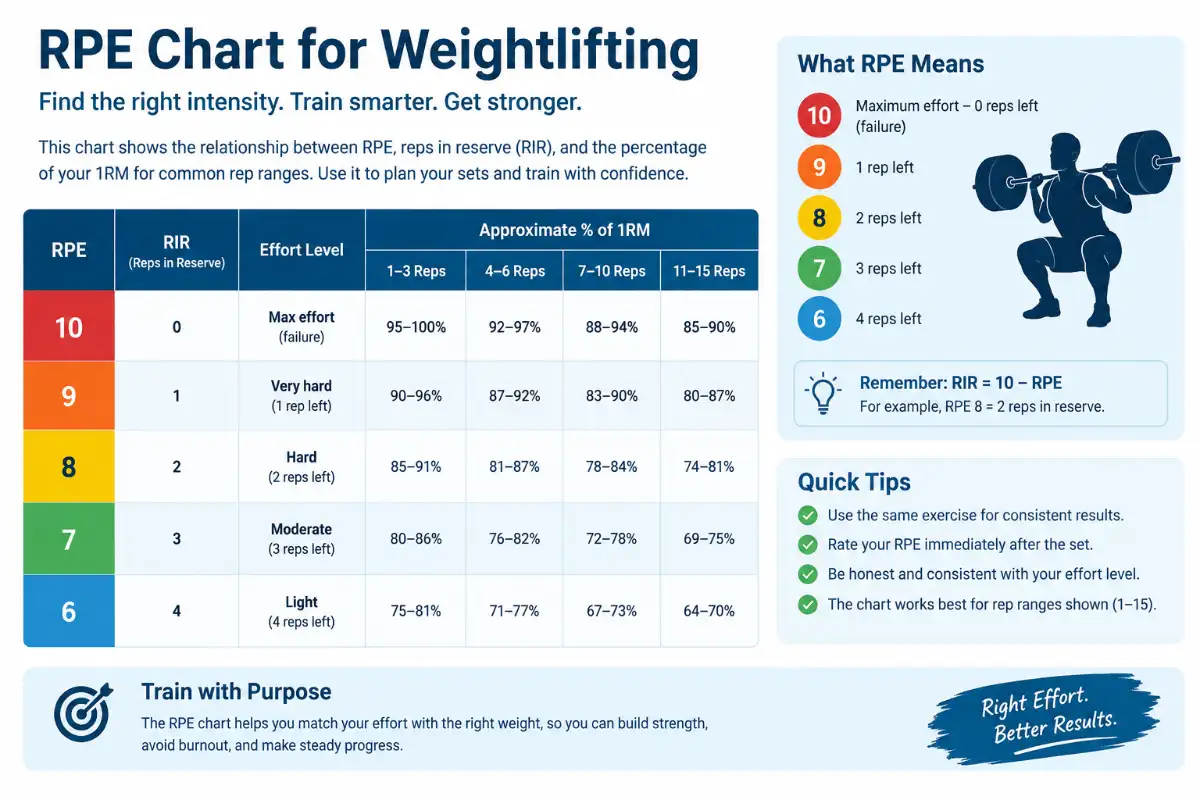
- RPE 10: Maximum effort, 0 reps in reserve
- RPE 9: 1 rep left (could do 1 more)
- RPE 8: 2 reps left
- RPE 7: 3 reps left
- RPE 6: 4 reps left
This chart shows you how to interpret RPE in practice. RPE is subjective – it’s “how hard it felt” – whereas RIR (Reps in Reserve) is the mirror image (“how many reps left”). In fact, RIR = 10 – RPE. So an RPE 8 set means about 2 reps in reserve (RIR 2). In programming, RPE and RIR are often used together: RPE tells you effort, RIR tells you remaining capacity. They give coaches and lifters the same information either way.
How to Calculate Your One-Rep Max (1RM) Using RPE
RPE Calculator Formula
To find your one-rep max (1RM) from RPE data, calculators use well-known formulas and charts. A common formula is Epley’s:
1RM = weight × (1 + reps/30).*
For example, doing 225 lb × 5 reps predicts a 1RM of 225×(1+5/30) = ~262.5 lb (about 263 lb).
However, RPE adds nuance. Rather than ignoring effort, an RPE-based method uses percentage tables (like the Reactive Training Systems chart) to adjust for how close you were to failure. The Quantum Fitness calculator notes its RPE-based estimate “accounts for your effort level (RPE), making it the most specific” way to compute max. In practice, the calculator often does this in two steps: first it computes an estimated 1RM (e1RM) from your input set, then it uses that e1RM as a reference to fill out the chart for other RPE/reps.
Example of an RPE-Based 1RM Calculation
Suppose you lifted 200 lb for 5 reps at RPE 8. An RPE calculator might estimate your 1RM at around 240 lb. By comparison, the Epley formula would give 200×(1+5/30) = ~233 lb. The RPE method is higher because RPE 8 implies you had more left in the tank than if it were RPE 10. The calculator factors that in to yield a more tailored estimate.
As another example, if you did 225 lb × 5 @ RPE 9, your e1RM would be a bit higher. Epley says ~263 lb. If you were truly at RPE 10 (no reps left), that would be your failure point and the estimate might be very close to 263 lb. But at RPE 9 (one rep left), the RPE chart might reduce the intensity slightly. Each calculator may vary, but the key is: more reps or lower RPE -> lower estimated max; fewer reps or higher RPE -> higher estimated max.
How to Calculate Your Target Weight Using RPE
Once you have your e1RM, an RPE calculator tells you what weight to lift for different rep and RPE targets. It does this by converting your goal (reps + RPE) into a percentage of your e1RM, then multiplying by your e1RM.
For instance, common charts show that 5 reps at RPE 8 is about 81% of 1RM. So if your estimated 1RM is 250 lb, you’d multiply 0.81×250 to get ~202.5 lb. The calculator would then round to the nearest plate increment (e.g. 205 lb). In more general terms:
- %1RM = chart(reps, RPE), lookup from the RPE table.
- Weight = (e1RM × %1RM) / 100. For example, 200 kg × 81% = 162 kg.
- The tool usually rounds this to a practical load (5 lb or 2.5 kg steps).
This lets you plan any set. Say your goal is 3 reps at RPE 9 and your e1RM is 300 lb. You’d find “3 reps, RPE 9” in the chart (about 90–92% of 1RM). Multiply 300 × 0.90 ≈ 270 lb. The calculator will do that instantly. It essentially works as an RPE-to-Percentage Calculator, giving you a bridge between your effort level and actual weight to use.
How Accurate Is an RPE Calculator?
RPE calculators give good estimates, but they’re not perfect. Their accuracy depends on several factors:
- Quality of input: The reference set (weight/reps/RPE) should be recent and well-measured. A set from months ago or with sloppy form can skew the result.
- Consistency of RPE: You must be honest and consistent with how you rate RPE. Two lifters might rate the same effort differently. Overrating or underrating effort will change the outcome.
- Same exercise: Use the calculator for the same movement you did. RPE calibration for a squat is not the same for a bench press.
- Rep range proximity: The calculator works best when you aren’t extrapolating too far from your input. For example, converting 5 reps to 4 reps is more reliable than converting 5 reps to 1 rep.
In practice, experienced lifters who gauge their RPE well will find the calculator quite accurate. Beginners may find their RPE ratings vary until they learn the scale.
Common Calculation Mistakes: People can make errors that reduce accuracy. For example, rating RPE after resting can understate effort (the set “feels easier” in hindsight). Others suffer from “ego RPE,” inflating their effort level to brag about the lift. Both mistakes will give misleading 1RM estimates. It’s best to rate your RPE immediately after a set, while you’re still bent over catching your breath. Also, remember fatigue accumulates: if you do multiple sets, later sets at the same weight feel harder. The calculator doesn’t know this, so be mindful that your reference RPE should come from a well-rested set for best results.
RPE Calculator: Research and References
Learn more about rating perceived exertion and resistance training through these scientific research resources.
How to Use RPE for Strength Training
RPE isn’t just for calculators – it’s a powerful way to autoregu late your training. You can apply RPE targets to any lift (squat, bench press, deadlift, etc.) to match your daily energy and avoid overtraining. Here’s how:
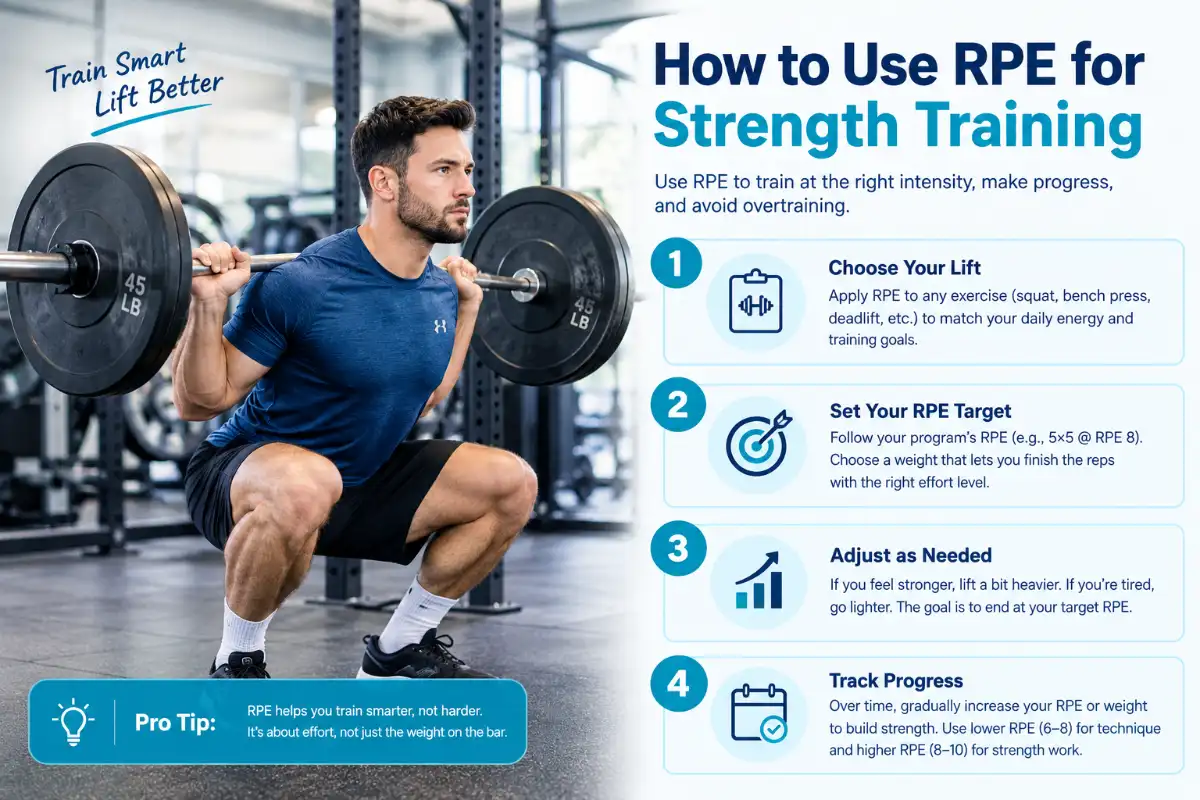
- Big lifts (Squat, Bench, Deadlift): Use RPE to adjust weight each session. For example, if your program says “Bench 5×5 @ RPE 8,” choose a weight that lets you finish 5 reps feeling like you had 2 reps left. If you feel unusually strong one day, you might lift a bit heavier; if you’re tired, go lighter. Either way, end around RPE 8. This ensures you’re training at the right intensity without forcing a set too heavy or too light.
- Progressive Overload: Over weeks and months, gradually increase your RPE or weight to drive progress. You might spend a cycle hitting RPE 7–8, then shift a cycle to 8–9 to push stronger lifts. The Gravitus RPE Calculator guide recommends using lower RPEs (6–8) for technique and higher RPEs (8–10) for strength work. This means you can structure your training so that not every set is maximal; some sets are controlled and others are challenging, spreading out fatigue. Tracking your progress through RPE also helps: if a given weight feels like RPE 7 for several weeks, you know it’s time to increase load.
By combining RPE with your programming, you ensure each workout is productive. Instead of always chasing a fixed weight, you “chase” effort. Over time, this creates a progression of effort, which naturally leads to heavier lifts. It also prevents burnout, because on bad days you simply pick a weight that meets the RPE target, rather than grinding too hard.
RPE vs. RIR: What Is the Difference?
RPE (Rate of Perceived Exertion) and RIR (Reps in Reserve) are two ways of describing the same idea. RPE is a number (1–10) for how hard the set felt. RIR is a count (0, 1, 2, …) of how many more reps you could have done. They are directly related by the simple formula RIR = 10 – RPE. For example, an RPE 8 set implies about 2 reps in reserve, so RIR = 2. In practice, some people prefer to think in RIR (e.g. “3 reps left”) especially when starting out, but both scales work the same. In fact, many RPE calculators call themselves “RIR calculators” for this reason. Whether you say RPE 9 or RIR 1, you mean the lift was one rep shy of failure.
Frequently
Asked Questions
It’s used to turn your effort levels into precise weights. You can use it as an Estimated 1RM Calculator and also as a RPE-to-Weight planner. By entering any set (weight × reps × RPE), the tool computes your estimated max and then tells you what weight to hit other RPE/reps targets. It’s essentially a smarter way to pick loads instead of guessing or only using fixed percentages.
RPE 8 means the set felt hard but sustainable – roughly two reps left in the tank. After finishing a set at RPE 8, you should feel like you could have done two more reps with good form. In other words, RPE 8 ≈ RIR 2.
Use the RPE calculator by inputting a recent set. It will apply formulas or charts to estimate your 1RM (often called e1RM). For example, doing 200 lb for 5 reps @ RPE 8 might give an e1RM ≈ 240 lb. You can also use classic formulas: Epley’s formula (1RM ≈ weight×(1+reps/30)) is one example. Plug your numbers into the formula or calculator and it outputs your estimated 1RM.
Yes. By definition, RPE 10 means maximal effort with no more reps left (technical or absolute failure). RPE 10 is basically the same as a set to failure. Most programs use RPE 10 sparingly (usually only on test days or final singles) because training to failure every set can be very fatiguing.
It can be used by beginners, but accuracy improves with experience. Beginners often misjudge effort, so their RPE ratings may not match reality. Over time, as you get better at sensing RPE, the calculator’s predictions will be more reliable. Also, beginners’ strength changes quickly, so an RPE-based Estimated 1RM Calculator is most useful when the reference set is recent and the user is consistent.
Absolutely. RPE is simply about how a lift feels, so it works for any exercise – including squat, bench, deadlift, and others. You can track RPE for each lift separately and use the calculator to plan each one. The principles are the same: enter your recent set for that specific exercise, and the tool will help you set weights and reps for your next sets of that lift. RPE is widely used in powerlifting and strength training for all the big lifts.